From README.mdSelf-hosted edition
AnswerHand is an AI responder for US-hosted Intercom Messenger workspaces.
Use of this software is governed by LICENSE.txt in this folder. Read it before installing.
Install in three steps
- Unzip the file you downloaded from Lemon Squeezy. Put the contents of the
selfhost folder inside it (this README's folder) at the root of your company's private GitHub repository.
- In Render, create a Blueprint from that repository. Review
render.yaml and deploy it.
- Open the public HTTPS URL, select Set up a workspace, and enter the
SETUP_TOKEN shown in Render's Environment tab, plus your Intercom credentials.
Always run continuously with exactly one instance. Free plans and autoscaling are not supported: sleeping servers cannot meet Intercom's five-second acknowledgment deadline. Budget approximately $13/month for Render Starter + Postgres Basic; OpenAI usage is additional. Prices change: verify https://render.com/pricing.
Configuration and backups
Node 20+ and PostgreSQL are required. The Blueprint provisions one Starter web service and one Basic database in Virginia. Required variables are DATABASE_URL, ENCRYPTION_KEY, SESSION_SECRET and SETUP_TOKEN. LICENSE_KEYS is not required with SELF_HOSTED=true. One connected workspace is enforced by a database unique index. After disconnecting, use SETUP_TOKEN again to reconnect.
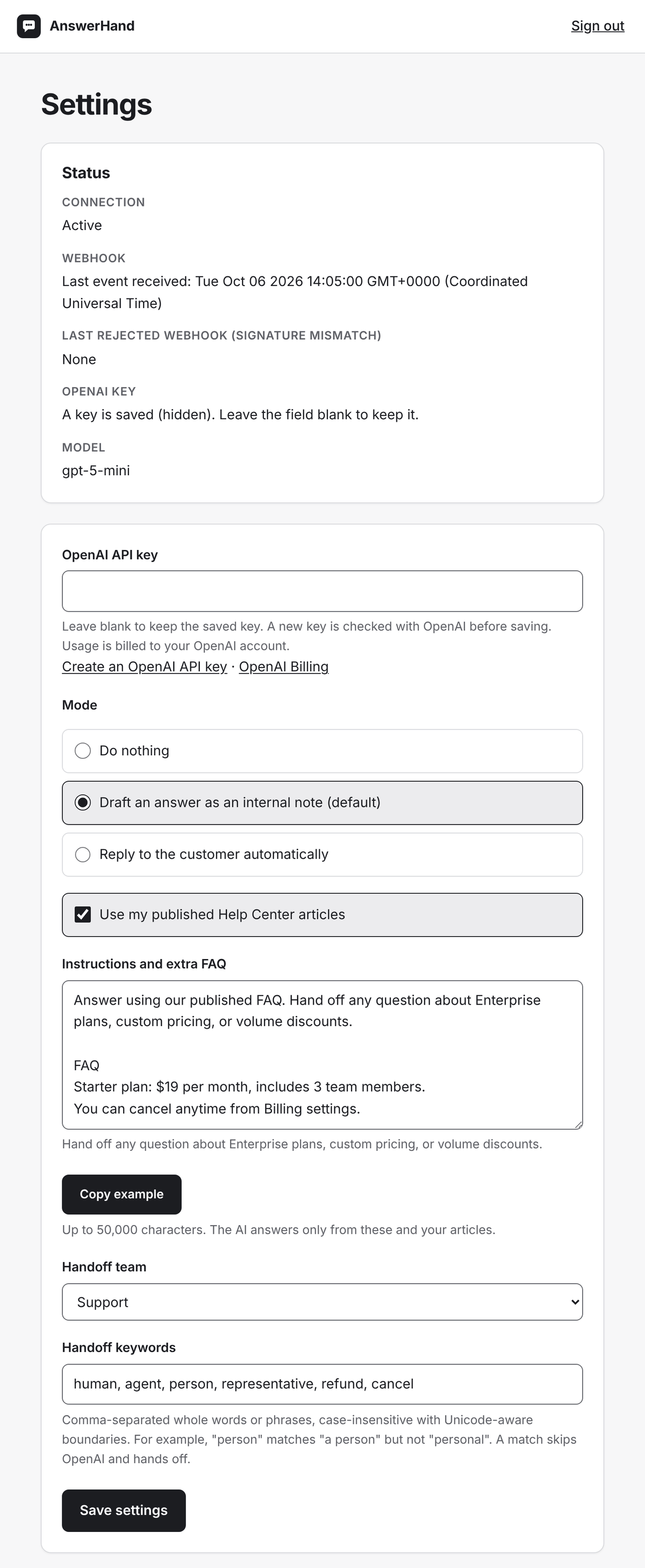
To change the AI model without editing code, set OPENAI_MODEL (in Render, on the Environment tab). The default is gpt-5-mini. Use only a model that supports Structured Outputs (JSON schema) in OpenAI's Responses API; other models cannot answer. Settings shows the model in use. After changing it, test once: send a question your FAQ covers from your Messenger and confirm an AI draft appears.
Keep ENCRYPTION_KEY unchanged and backed up in your password manager. A canonical base64-encoded 32-byte key is used unchanged; other values of at least 32 characters use HKDF-SHA256 with permanent versioned constants. Changing the key without re-encrypting data makes stored credentials unreadable.
Do not delete or change SETUP_TOKEN after initial setup. It is required for reconnection and recovery after Intercom token reissuance. Keep it in a password manager alongside ENCRYPTION_KEY. SESSION_SECRET must be at least 32 bytes; SETUP_TOKEN must be at least 32 characters. Back up the database securely too.
For another host, build the Dockerfile, supply variables through its secret store, use PostgreSQL, and terminate HTTPS at your reverse proxy. Run one replica only. The app uses Secure cookies. Render internal database URLs need no SSL mode. External databases requiring TLS should use sslmode=verify-full with a trusted certificate; require/prefer/verify-ca are normalized to verify-full. Do not disable certificate verification for external databases.
- Use a US-hosted workspace. In Intercom Developer Hub create your own private app.
- Enable these five permissions (verified working): Read conversations, Write conversations, Read admins, Read one admin, and Read and list articles. A new Developer Hub app starts with almost every permission already checked on its Authentication page. Uncheck everything except these five, then save. For assigning handed-off conversations to a team, see step 6.
- After changing permissions, the access token shows an outdated permissions warning. Open Test and publish, then Your workspaces, and regenerate the token. Use only the regenerated token; regenerating makes the previous token stop working. Get the Access Token from the app's Authentication page and the Client Secret from the app's Basic information page. Any later permission change requires regenerating the token the same way.
- Connect using the app's Setup page. Replies use the workspace bot identity; if no operator bot is found, Settings warns that the connecting admin's name will be used instead.
- Disable Fin/Operator automatic responses for conversations handled by this app.
- Create a support team in Intercom and select it as the handoff team in Settings. On handoff, the app posts the
[AI-HANDOFF] note first, then assigns the conversation to that team. After step 10, test it: send a Messenger message containing human (a default handoff keyword) and confirm the assignment. If Intercom refuses the assignment, the note stays and the AI still stops, but the conversation is not assigned and the app does not retry; Render's Logs show pipeline_failed with an HTTP status. In that case, compare your app's permissions with Intercom's API documentation for assigning a conversation, add the missing one, regenerate the token (step 3), and update the token as described in Sign in, update and recover.
- Enter your own OpenAI API key in Settings. This is BYOK: the server does not use
OPENAI_API_KEY for application responses. Saving a key makes a small paid test request; insufficient quota prompts you to add credits in OpenAI Billing.
- Add instructions and FAQ. The AI is instructed to answer only from these and your published Help Center articles (if enabled), but it can still make mistakes. Start in internal draft mode, check the drafts, and enable customer replies only once they look right.
- Copy the webhook URL into your private app's Webhooks section. Subscribe to
conversation.user.created and conversation.user.replied, then select Save. When you save, Intercom automatically sends one test notification. You can also send one real message from the Intercom Messenger to confirm delivery.
- In Settings, check the Status section. If Last event received has updated and Last rejected webhook (signature mismatch) shows None, delivery works and Client Secret is correct. If the rejection is newer, correct Client Secret and test again.
- Do not run this app alongside another automatic responder. If two apps in the same workspace subscribe to the same webhook topics and both reply automatically, customers receive two answers. Turn off or unsubscribe any other auto-reply app (in addition to Fin/Operator, step 5).
Sign in, update and recover
Normal sign-in uses the exact saved Intercom access token. In Settings you can replace the token and/or Client Secret; the token must identify the same workspace. If the old token is revoked, select Recover access on the sign-in page and enter the new token and SETUP_TOKEN. Client Secret replacement is optional. Recovery failures use one generic message and share the login attempt limit. Updating credentials invalidates previous sessions. Disconnect deletes local credentials, settings and conversation-processing metadata; also remove the Intercom webhook.
Privacy and behavior
This app does not store conversation text. Conversations remain in your Intercom workspace and are processed through your own OpenAI account, subject to OpenAI's data policies. The software vendor receives neither your conversations nor your credentials from this app. Runtime provider requests go only to api.intercom.io and api.openai.com; the app also connects to your configured PostgreSQL database. There is no telemetry, remote licensing, external script, font or analytics. Outbound website links require a user click; infrastructure providers operate under their own policies. Provider redirects are rejected.
The database stores encrypted credentials, settings, identifiers, counters and timestamps, not conversation bodies. Handling records expire after 30 inactive days and are deleted on disconnect. Logs contain fixed events/statuses and allowlisted configuration names/reasons, never credential values or message text. Drafts are internal notes. AI comments are capped at six per conversation. Only customer-visible replies count; internal notes do not. After the sixth, the AI posts nothing more in that conversation (no reply, draft, handoff note or team assignment), so handle later messages in Intercom; Logs show reply_cap. The count is cleared 30 days after the AI's last post in that conversation. Human-admin takeover and [AI-HANDOFF] stop processing. Intercom sends and database writes are not atomic; a crash between them can require operator reconciliation.
Troubleshooting
If Render marks deployment unhealthy, open the Logs tab. A configuration_error event names an allowlisted required variable with reason missing or invalid. Correct it in Environment without sharing its value. The health endpoint returns 503 and forms are disabled until configuration and schema are ready. startup_failed without configuration_error can indicate a database/schema problem; check connectivity and database privileges.
Do not change ENCRYPTION_KEY to fix a deployment problem. startup migrations are idempotent in SELF_HOSTED mode, including the signature timestamp and singleton workspace index. Existing multiple-workspace databases fail rather than delete data.
Tests and updates
Run npm install, then npm test. PostgreSQL integration tests use rollback-only temporary tables when DATABASE_URL is supplied; otherwise that integration test is explicitly skipped. Other tests need no provider credentials or paid calls. npm run eval is manual only, using OPENAI_API_KEY in the caller's environment; it makes paid synthetic requests and is never run at startup, install or build.
The Settings footer reads the version from package.json. Public pages omit it. The distribution builder copies that version from the source package; do not maintain a separate VERSION file. Review CHANGELOG.md before upgrading.